Trial Mode Instructions
Trial Mode: No registration required. Perfect for testing and small PDF files.
Parameters
| Parameter | Type | Required | Description |
|---|---|---|---|
pdf_path |
string | required | Path to the PDF file to process |
result_path |
string | required | Path to save the parsing result |
format |
string | required | Output format: "json" or "md" |
task_id_path |
string | required | Path to save task ID information (JSON format) |
--task-id |
string | optional | Existing task ID to resume processing |
Usage Examples
Normal Upload Mode
python handler.py <pdf_path> <result_path> <format> <task_id_path>Resume from Existing Task or Check Status
python handler.py --task-id <task_id> <result_path> <format>
Limitations: Trial mode has page limits. Visit https://api.pinocch.com/index to register for additional credits.
Authenticated Mode Instructions
Authenticated Mode: Get more credits and advanced features by registering.
Getting Started
To use this skill with authentication, you need to register and obtain your API token:
- Register an account at https://api.pinocch.com/index
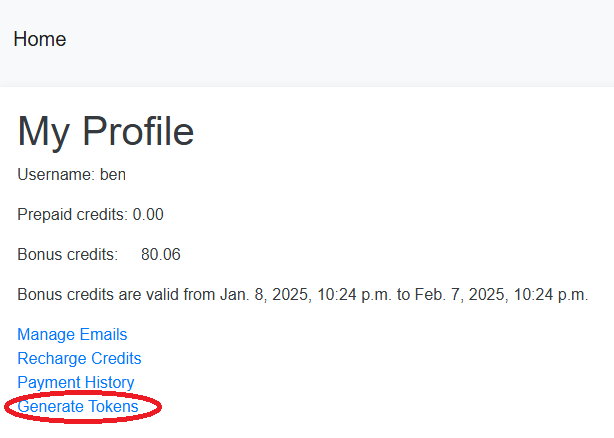
- Navigate to the My Profile page
- Generate your API token (see screenshot below)
- Create a file named
secret.txtin the skill directory with the following format:
username: <your username>
secret: <your token>
Token Generation Screenshot:
Parameters
| Parameter | Type | Required | Description |
|---|---|---|---|
username |
string | required | Username for authentication |
secret |
string | required | Secret token for authentication |
pdf_path |
string | required | Path to the PDF file to process |
result_path |
string | required | Path to save the parsing result |
format |
string | required | Output format: "json" or "md" |
task_id_path |
string | required | Path to save task ID information (JSON format) |
--task-id |
string | optional | Existing task ID to resume processing |
Usage Examples
Normal Upload Mode
python handler.py <username> <secret> <pdf_path> <result_path> <format> <task_id_path>Resume from Existing Task or Check Status
python handler.py --task-id <task_id> <username> <secret> <result_path> <format>